MemoCat Icon MemoCat v0.5.0
Local-First Architecture · macOS Desktop App + Chrome Extension

Unify Scattered AI Chats into a Local Searchable & Recallable Workbench

MemoCat indexes local session logs from Codex, Claude Code, Grok Bot, and Antigravity alongside web conversations across 9 AI chat sites into a single local SQLite store—with structured reading, full-text search, and local HTTP MCP recall on 127.0.0.1:3792.

4 Local AI Log Adapters 9 Web AI Platforms HTTP MCP Cross-Tool Recall No Accounts · No Cloud · No Telemetry
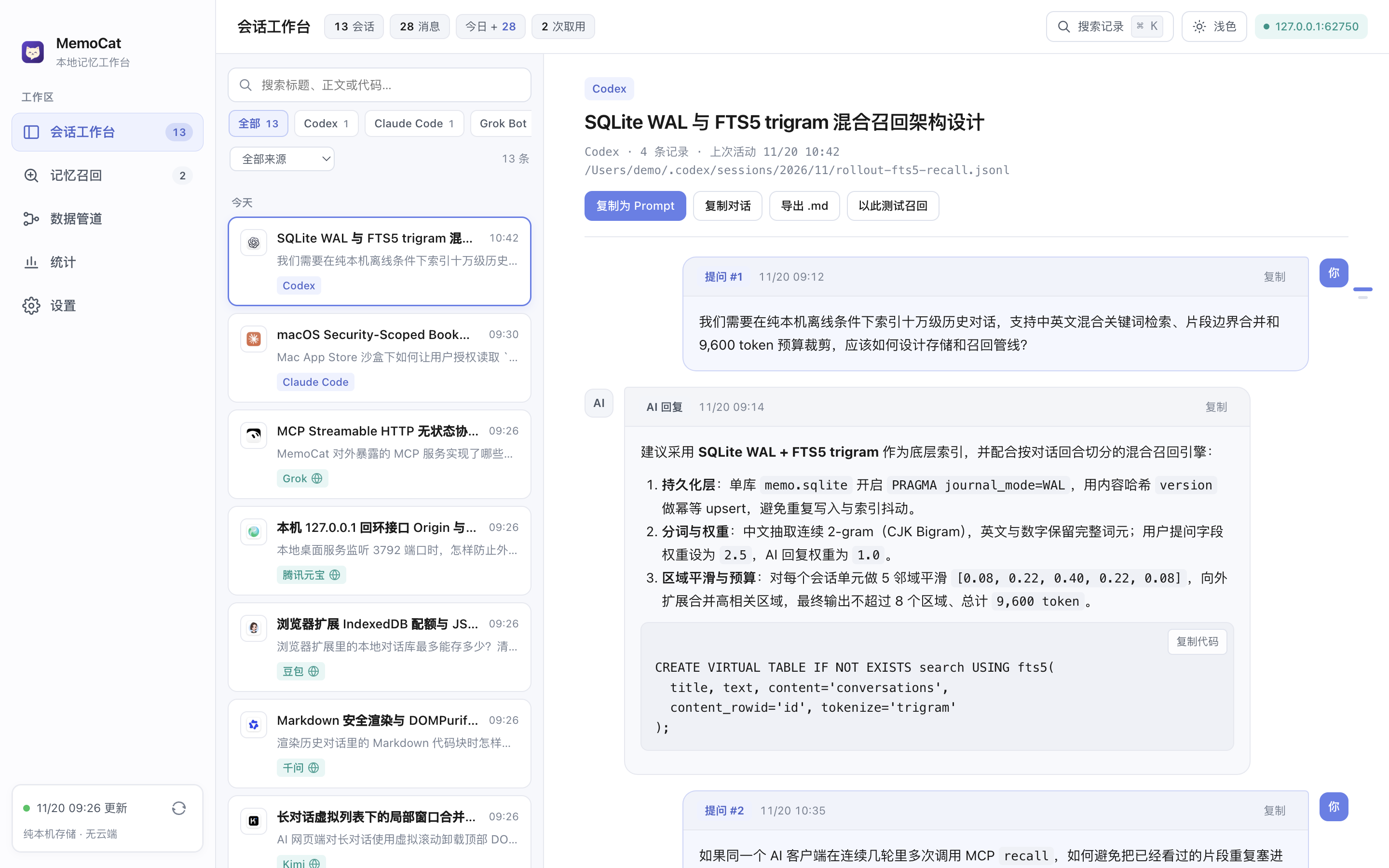
MemoCat Conversation Workbench in Light Mode
Conversation Workbench (Light): Left pane source filter pills and ⌘K full-text search; right pane chat-bubble turns with code block copy. Live Capture · MemoCat v0.5.0

Dual-Input Archive: Local AI Logs & Web AI Chats

The desktop workbench reads local AI tool transcripts strictly read-only, while the Manifest V3 browser extension captures loaded web conversations and syncs incrementally over localhost.

Local CLI & Desktop AI Logs

Line-by-line streaming ingestion without altering original logs

4 Adapters
Codex
Codex ~/.codex
Claude Code
Claude Code ~/.claude/projects
Grok Bot
Grok Bot ~/Library/.../Grok Bot
Antigravity
Antigravity ~/.gemini/antigravity
  • Read-Only Sandbox Bookmarks: Desktop uses macOS native directory picker with Security-Scoped Bookmarks (supporting hidden folders) to persist read-only permissions across launches.
  • Streaming Large Log Parser: Parses JSONL and `.blob` replicas line-by-line with no 64 MB cap; pre/post-read identity, size, and mtime verification preserves prior versions on malformed writes.
  • Local Hash Image Cache: Ingests base64 and local image references (PNG/JPEG/GIF/WebP up to 32 MB) into local cache for offline inspection and click-to-zoom.
  • Scheduled Auto-Sync: Configurable 1–1440 minute interval (default 5 min), merging duplicate log snapshots idempotently without inflating daily counts.

Browser Extension (Manifest V3)

Floating save pill & in-page drawer sidebar on supported chat sites

9 Web Platforms
ChatGPTChatGPT
ClaudeClaude
GeminiGemini
DeepSeekDeepSeek
Tencent YuanbaoYuanbao
DoubaoDoubao
KimiKimi
QianwenQianwen
GrokGrok
  • Partial-Window DOM Reconciliation: Uses MemoCore.reconcile with stable DOM IDs and exact text cursors so virtualized scrolling on long threads never erases saved history.
  • Three Extension Surfaces: On-page floating button & slide-over sidebar, toolbar popup, and full library workbench with title editing, recapture, and source links.
  • Backup & Portable Export: Stored in browser IndexedDB (unlimitedStorage) with per-thread Markdown/JSON export and incremental JSON backup restore.
  • CAS Outbox Desktop Sync: Pairs with 127.0.0.1 using a 256-bit Bearer token; monotonic sequence numbers and UUID changeId acks prevent stale overwrites.

Structured Reading, Hybrid Recall & Delivery Auditing

Powered by Node.js 24 built-in node:sqlite and HTTP modules. Desktop and local web interfaces share the exact same indexing, ranking, and delivery engine.

Two-Pane Conversation Workbench

Filter threads by source pills or date, and read clean user/assistant chat bubbles with syntax-ready code blocks and question outline navigation.

  • Quick Search: ⌘K across titles, message text, and code
  • Keyboard Flow: ↑ / ↓ thread switching + right-edge question outline
  • Export & Reuse: Copy as structured XML prompt, Markdown, or .md file
  • Responsive Shell: Compacts down to quarter-screen width (< 600px)

Hybrid Search & Region Budget

Combines SQLite WAL + FTS5 trigram indexing with turn-level BM25 neighborhood smoothing to assemble high-signal context within token limits.

  • Tokenization: CJK overlapping 2-grams + alphanumeric tokens
  • Weights: User turn 2.5 vs assistant 1.0; primary 1.0 vs keywords 0.72
  • Region Smoothing: 5-neighbor kernel expands and merges adjacent matches
  • Hard Cap: Up to 8 regions and ~9,600 tokens per recall call

Context Deduplication & Audit Trail

Tracks each AI conversation via process_id and a 3-state delivery table so repeated recalls do not resend already delivered full units.

  • Caller Binding: Issues process_id scoped to each MCP caller path
  • Delivery States: prepared, committed, and abandoned
  • Deduplication: Excludes committed full unitIds; retains truncated parts
  • Audit Stream: Inspect exact text snapshots delivered in past recalls

Local Streamable HTTP MCP Endpoints

While running, MemoCat exposes stateless JSON-RPC 2.0 POST endpoints on http://127.0.0.1:3792 with per-client switches and source whitelists.

recall Memory Retrieval

Accepts query, up to 8 alternatives, date range from/to, sources filter, and process_id. Triggers an on-demand sync before returning attributed segments.

list_conversations Date Inventory

Lists archived conversation metadata across up to 31 days in the host timezone, restricted by the calling client's source whitelist.

Per-Client Source Scopes Policy Enforcement

/mcp/codex, /mcp/claude-code, and /mcp/other-local enforce independent toggle states and source allowlists; requests abort if policy changes mid-recall.

[mcp_servers.memocat]
url = "http://127.0.0.1:3792/mcp/codex"
Target: ~/.codex/config.toml · Built-in handshake test available under Data Pipeline

Local-Only Security Design & Known Scope

All parsing, indexing, and retrieval execute locally on your machine. Below are the implemented safeguards and current technical boundaries.

Zero Remote Servers or Telemetry

No user accounts, no cloud relay, and no analytics, crash reporting, or tracking SDKs (NSPrivacyTracking = false in the macOS privacy manifest).

Strict Loopback Validation

HTTP endpoints bind exclusively to 127.0.0.1 and validate Host, Origin, and Sec-Fetch-Site; extension sync checks the paired 32-char extension ID and 256-bit Bearer token.

Sandbox & Content Sanitization

Electron enforces contextIsolation and renderer sandbox; the extension applies script-src 'self' CSP; Markdown output is sanitized via DOMPurify.

Transparent Local Data Control

Local web mode defaults to ~/.memocat/<userId>/memo.sqlite (configurable via MEMO_DATA_DIR); desktop stores data under Electron userData for clean backup or deletion.

Current Technical Boundaries (v0.5.0)

  • Local memo.sqlite and exported JSON backups store plaintext conversation records without application-layer encryption; rely on macOS FileVault and file permissions.
  • The browser extension captures loaded visible DOM text only; it does not scrape private backend APIs for unexpanded history or auto-download remote images/media.
  • DMG and Mac App Store .pkg builds are generated via included build scripts (npm run build:dmg / npm run build:mas) and require Apple certificates for notarized/store distribution.

Three Ways to Run MemoCat

Requires Node.js 24+ (for built-in node:sqlite). Run the macOS desktop app, the local web server, or the Chrome/Edge extension independently or together.

Option 01 · macOS Desktop App

Electron Desktop Workbench

Includes native macOS menu bar, view shortcuts (⌘1..5), background tray service on port 3792, and DMG / MAS bundle scripts.

git clone https://github.com/qiwihui/MemoCat.git
cd memocat
npm install
npm run desktop

Run npm run build:dmg to produce a local macOS disk image.

Option 02 · Local Web Mode

Node.js Built-in HTTP Server

The backend relies solely on Node.js built-in modules. Open http://127.0.0.1:3792 for full archive, recall, and MCP endpoints.

npm start
# Custom data directory & port
MEMO_DATA_DIR=/path/to/data PORT=3792 npm start

On macOS, you can also double-click Start MemoCat.command after cloning.

Option 03 · Chrome / Edge Extension

Load MV3 Extension

Build the extension package and load the unpacked output under Developer Mode in chrome://extensions.

npm run build:extension
# Load unpacked folder:
# dist/memocat-extension

Click "Connect & Sync" inside the extension to automatically pair with port 3792.